How can I control my elderly parent's phone — and should I track it, or just help with it?
Published by Corso & Alexander · About David Luria · Updated
The people and first-person scenes in this article are fictional/composite examples, created to illustrate the issues. They are not the author’s personal history. The scenes illustrate caregiving situations; they are not evidence of clinical or legal outcomes.
Controlling an elderly parent's phone is usually the wrong goal, and the tools that promise it are the ones most likely to lock you both out. What you need is a way in that your parent agrees to, a recovery path — the phone number and backup email the accounts fall back to — that one of you can actually reach, and a written plan for the day the phone is lost. None of those is an app. A tracker tells you where the phone is and nothing about whether your mother can get into it. Start with the recovery path; it decides whether every other problem takes five minutes or six weeks.
Here is the afternoon that taught me the difference.
How to monitor an elderly parent's phone: the afternoon I tried
My mother, Sophia, keeps her whole life on a phone she calls "the machine," as if it were a single stubborn appliance and not a doorway into everything. Her photos and her email are on it. The pharmacy texts her there, and so does the pension office, and so did, on the Tuesday I am thinking of, a man who said he was from her bank.
He was not. She knew it, more or less — she called me instead of calling him back, which is why this is a story about an afternoon and not about a year. But it rattled her, and it rattled me more, and I did what a lot of adult children do the first time they feel that particular cold. I decided the phone was the problem and that I would take charge of it.
I drove over, sat at her kitchen table with her phone in my hand, and began, with great confidence, to install the kind of app that lets one phone see another. It would, the reviews said, give me peace of mind, which is the phrase that should have warned me.
Twenty minutes in, the app wanted her to sign in to the account that held her email so it could "link the devices." She did not know the password; the phone had remembered it for her for four years. The app offered to reset it and sent a code — to a number two carriers and one flip-phone ago. And there we sat at the kitchen table, locked out of her own email by the thing I had installed to protect her from strangers.
I had gained control of nothing. I had spent a lock she did not know she had.
If you are here, maybe you have felt that cold too — a call she should not have answered, a text she almost tapped. Or nothing has happened yet, and the phone has quietly become the thing standing between you and being able to help her at all. Here is what I learned once I put the app down.
Why "control my parent's phone" is the wrong question
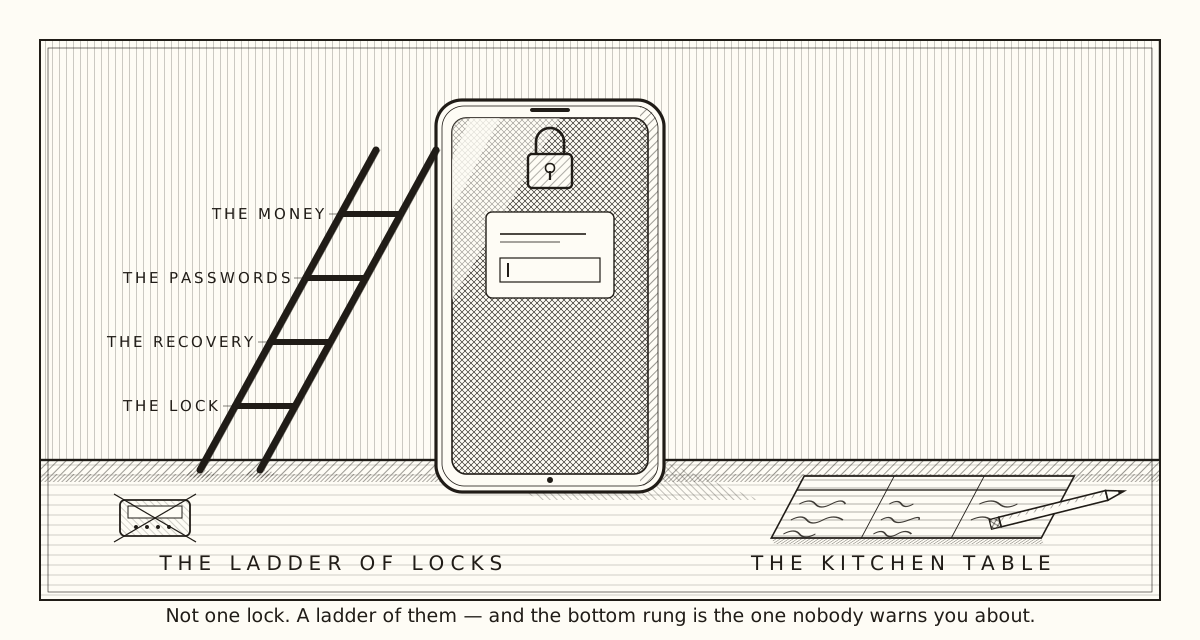
The phone is not one lock. It is a ladder of them, and the tracking apps aim at a rung that does not matter.
On most phones sold in the last several years, the sign-in you are staring at is not a password to the device in your hand. It is the password to an account that lives somewhere else — with whoever made the phone — and the phone is just one of the places that account opens. So the password to the phone is the password to her email, her photos, and very often the recovery for everything else she has ever signed up for.
That is what cost me the afternoon. Type the wrong thing too many times and you do not just fail to open the phone. You trip the account's own alarms, and the company's answer is account recovery — a process that texts a code to the number on file. And the number on file, for a parent who has had the same email since a daughter set it up in 2009, is very often a number she no longer owns. Now you are not opening a phone. You are trying to prove to a trillion-dollar company that you are your mother, using a phone she threw away.
None of that is your parent's fault, and it is not yours. Sophia signed in the way the setup screen told her to, years ago, and never had a reason to write down which of her three passwords she had used. The machine welded a convenience into a wall and never mentioned it.
So when you type how can I control my elderly parent's phone at eleven at night, understand what you are really asking. Not for control. To be able to help when the phone stops cooperating — with a stranger, a password, a message she cannot open. That is a different problem, and its answer is mostly done at the kitchen table in daylight, with her, while she can still read you a code.
Track elderly parents' phone — or fix the recovery path first?
Fix the recovery path first. Everything else depends on it.
This is the rung people skip on their way to the tracking app, and it is the one that turns an afternoon into a month. Before you install or reset anything, find out where the account's recovery runs — which phone number, which backup email — and confirm that one of you actually controls them. If the recovery phone is a number your mother has not had in years, changing it now, while she can read you a code off the phone she does have, is the difference between a five-minute reset and a six-week appeal.
Here is how that went once I stopped trying to be clever. We opened the settings together; she held the phone and I pointed. We found the account, and under it the recovery number — the dead one — and a backup email she had not opened since the old computer died. She changed the number to her current one. She added my email as the backup, because she wanted to, and because a second door she trusts beats a single one that leads to a landfill.
That was the afternoon's real work, and it took eleven minutes. Nobody was tracked. But the next time the phone locks her out — and it will — the code will arrive somewhere a living person can read it.
Then, and only then, the next rung.
Where her passwords actually live
Getting into the phone is not getting into the accounts. That was the second surprise.
Once you are in, you find the phone remembers things you still do not. The browser quietly stores logins as you go; some phones keep a separate vault of saved passwords; some people use a password manager on top. Some of your parent's accounts will be in the browser, some in a vault, and some only in her head. Knowing which is which tells you what you have and what you are still missing.
The last category is the one to rescue first. A password that lives only in someone's memory is one bad week away from being gone — a fall, a hospital stay, an ordinary week where she cannot come to the phone and you have to. We sat with a sheet of notebook paper and three columns: the account, where the password lives, and whether the recovery reaches someone. It lives in the drawer with the estate papers now, not the drawer with the good scissors.
And one rule I hold to: the banking logins live at the top of the ladder and get treated differently from everything below. Never stored loosely, never left in a browser's memory on a device that leaves the house, never typed into anything but the bank's own app. The top of the ladder is also the one with the longest fall.
Elderly parent keeps losing phone — what we did about it
She loses it about once a week — under a cushion, in the car, in the pocket of the coat she was not wearing. That is not a memory problem; I lose mine too. It becomes a problem only when the lost phone is also the only place her recovery codes arrive — which, until that afternoon, it was.
So here is what a lost phone looks like now, at her house. The find-my-phone feature built into the phone is turned on — with her, on her own account — so that when it is under the cushion she can make it ring from the tablet, and if it is ever truly gone she can lock it herself. I did not need a second app to see where the phone was. It already knew; she just needed to know how to ask it.
We put a slip of paper in her wallet, in her handwriting: my number, and her carrier's help line, copied off the bill. Not a password. Never a password in a wallet. Two numbers, so the first ten minutes after losing the phone are not also the first ten minutes of not knowing who to call.
And the backup email is what turns a lost phone from a catastrophe into an errand. When the replacement arrives and wants to sign her in, the code has somewhere to go. Not a tracker — a second door.
Elderly parent not answering phone: the question underneath
I want to say something about the other reason people type these searches, because it was mine too, some nights.
She does not always pick up. She is in the garden, or the ringer is off, or she muted the call by trying to answer it. And when she does not pick up, a part of you goes straight to the worst place, and the worst place is what the tracking apps are selling to. See where she is, any time. They know which fear they are naming.
Here is what I decided, and you may decide differently. I did not want to be the man who watched a dot on a map to feel close to his mother. So we agreed on something older than any app: she calls me on Sunday; if she has not by supper, I call her; if she does not answer I try once more and then I drive. We have needed the drive once. She was asleep with the television on. I would rather have had the drive than the dot.
If the not-answering is new — a parent who always picked up has stopped, or the phone sits dead for days — that is a pattern worth writing down and taking to her doctor. A phone she keeps losing and a phone she has stopped using are two different things. Only one is a phone problem.
Apps for elderly parents: what I would and would not install
The honest answer is that the most useful things were already on the phone.
Larger text. A louder ringer. Her three most-called people on the first screen. The built-in call-blocking and the carrier's spam filter turned on — the Federal Trade Commission's guidance starts exactly there, with the phone's own features and what the carrier offers, before any app. The "unknown callers go to voicemail" setting, which she resisted for a month and now calls the best thing I ever did for her, because the man from the bank cannot reach her and her friends all leave messages.
What I would not install is anything that lets my phone see her screen without her knowing it is there. Not because those tools are all bad — some are how a daughter three states away resets her father's password every month — but because the wrong one is a gift to a scammer. The same afternoon a stranger called claiming to be her bank, a stranger could have called claiming to be me, asking her to install "the app your son set up." If she has never seen me put anything on her phone in secret, she has no reason to believe that story. If she has, she does.
So the rule at our table: anything that goes on her phone goes on with her. Installed together, a kindness. Installed in secret, a verdict — and a hole in the fence.
How to handle elderly parents who refuse help with the phone
Some will refuse. Sophia did, the first two times, and I would have too.
What she was refusing was not the help. It was the story underneath it — that the woman who ran a household and two jobs could no longer be trusted with a rectangle of glass. I led with safety, and she heard you are not competent, and she was right to hear it, because that is what I had meant without saying it.
The conversation that worked was not about the phone at all. "I locked you out of your own email trying to help, and I am sorry. I would like to fix it with you instead of around you." The apology was the door. After it, "show me where your recovery number is" was a question between two adults, not a test she might fail.
Then one real thing, not a list. Not scammers target seniors — she has heard that a thousand times and it lands like an insult. "The man who called on Tuesday scared me." She had been scared too. She had not wanted me to know.
If you cannot find the words, it is fine to borrow some. Describe your actual parent and phone to whatever helper you use and ask it to help you say the thing without making her feel small. One rule: give the helper the shape of the problem, never the keys. A login you cannot identify, a recovery path you cannot confirm — that is the shape. The password itself never goes into a chat window.
What it cost when it went wrong
Let me be honest about the bill, because the search results were not.
The afternoon I tried to take control cost the rest of that afternoon, and then a week. The email she was locked out of was the one the pharmacy used; the refill reminder went unread, and she ran out of a medication for two days before either of us understood why. The account came back, but only after a call in which a pleasant young man asked her to confirm a code sent to the dead number, then gently asked whether the man on the line — me — was someone she wanted on the call at all. He was doing his job. I had made it necessary.
And there was a cost that shows up on no bill. For a week she watched me handle her phone like it was mine, and I watched her stop asking me questions about it. She had decided, reasonably, that asking for help meant losing a piece of it. It took a month of doing it with her to earn that back.
The tracking app never got installed. I deleted it that night.
The landing
She still calls it the machine. It still welds a whole life to one login and warns nobody. But the recovery number is hers, the backup is mine, the paper is in the right drawer, and the unknown callers go somewhere she never has to hear them.
None of that gave me control of her phone, and I am glad. What it gave me was a map of the ladder, drawn while she could still help me draw it — and a mother who hands me the phone when it misbehaves instead of hiding that it did. That is the "control" I would wish for you. Not a dot on a map. A parent who still asks.
If you are at that kitchen table tonight with her phone in your hand, here is what I have. Put the app down. Find the recovery number and the backup email, together, and make sure they reach someone alive. Write down where the passwords live, and rescue the ones that live only in her head. Turn on what the phone already does. Install nothing in secret. And when she refuses, apologize for the part you got wrong, name the afternoon that scared you both, and ask again as her son, not her administrator.
The phone was never the problem. It was the first place you noticed that being able to help her had become something you build on purpose. Build it in daylight. The afternoon you save is one you spend beside her instead of in front of her screen.
If the stranger who called is the reason you are here, the note on what to do when a parent is being scammed is where I would go next. The front page says what this small house is trying to do, one book at a time.
Sources and further help
Source link checked September 22, 2026. General information only; the settings named vary by phone and carrier.
This is the idea at the center of one chapter of Managing Mom's Money With Love, the Tempered Press field guide to your aging parents' finances, out now on Amazon. One email when a book ships. Nothing between.
The books
- Managing Mom's Money With LoveA field guide to your aging parents' affairs — and the institutions that keep saying no. out now on Amazon.Buy on Amazon now
One email when a book ships. Nothing between. Unsubscribe any time; never sold or shared.